Ara: History Untold
Games | | Links: Homepage
Credit: https://www.oxidegames.com/products/ara-history-untold/
“ARA is a historical, turn-based grand strategy game, where you play as various leaders from history and lead your nation to victory.
I worked primarily on the UI team, both on the implementation side as well as the framework side. In addition to that, I also worked on the Graphics team and the Living World renderer. For obvious reasons I cannot go into too much detail, but I would like to share some of the features that I am extremely proud of.
Data-driven gradients
A lot of readers familiar with popular game engines might consider this a trivial feature, but on a proprietary engine someone has to implement it. The reason I am proud of my implementation is that it completely eliminated the need for artist to make bespoke gradient assets and textures while at the same time being fully responsive and composable with all the other UI components/systems. In fact, at launch I estimate around 80% of the entire UI was based around that system to some extends for its visuals.
A gradient consists of a number of “stops” which are just points along the gradient. A stop can specify either a color value at that point or an alpha value, as the two can be sampled independently across the gradient to achieve the desired effects. The gradients are defined through a text-based, human-readable representation. For anyone familiar with photoshop gradients, it is more or less a text based version of this UI:
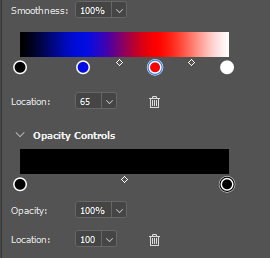
Photoshop’s gradient ui
Ideally, I would have liked to create a similar interface but the system received enough positive support and feedback from our art team that it was decided to move on. The following image shows the City screen where a lot of the UI is using gradients to various degrees. The QoL bars were designed specifically to make use of this feature for example.
The screen is from the current live version of the game where the color pallet has moved away from the original blue gradient.

ARA’s City Screen (live version as of 12/8/2025)
It was quite interesting to see the impact such a small feature had to the workflow, and experience, of multiple artists.
Additive blending for the UI
This is another feature that might sound like a given or trivial, but we had some unique constraints to deal with. The constraints were the following:
- The UI is rendered to a separate texture then composed at the end with the game scene.
- The final UI texture needs to be alpha pre-multiplied and the alpha of that texture will be used to blend with the scene texture.
- Most of the UI look and feel is based on transparency, therefore needs alpha blending.
- The entire UI needs to be rendered with a single blend state.
The first two should be very obvious as well as familiar to anyone that has worked with UI or even games in general. The third is just a stylistic choice and the last one is just a restriction that I had to work around.
Before I move on, I would like to provide some resources about pre-multiplied alpha and why would (and more than likely should) want to use it:
With all of that out of the way, how do we get a single blend state to perform different types of blending? The resources above do go into detail about similar issues so I won’t meander too much. My approach came down to moving the pre-multiplication into the shader itself then make use of Dual Source Blending to manipulate from the shader what alpha value gets written to the final texture.
Dual Source Blending is a feature of graphics APIs where the shader can output two colors instead of one for a single render target. These two output colors can be used as inputs to the blending functions to decide how it will be blended with the render target. Unfortunately this method means that any pass using it must have exactly one render target, as writing to more than one render targets is undefined behavior.
The reason I am proud of this solution is how quickly it came together and how good of a result it gave us, but some time you’ve gotta do what you’ve gotta do. Admittedly if I had the opportunity and time to do it again, I would spend the time to remove the reason I had to use Dual Source Blending to allow for multiple render targets and to maintain the benefits of rendering the entire UI with a single PSO.