Under the Bay
Games | | Links: Project Page
“Under the Bay” tells the story of a world beneath the surface of the Chesapeake Bay
“Under the Bay” is an interactive, AR experience, telling the story of a world beneath the surface of the Chesapeake Bay. Users can interact with various scenes while live data streaming in directly form the bay itself shapes the experience.
As the lead developer, this entry focuses on the engineering and software architecture that underpins Under the Bay. For narrative context and the accompanying free podcast, please visit the official page.
Changing between scenes
One of the core experiences we wanted users to have, was the feel of a digital flipbook, where they could browse through the various stories in a familiar way. We also knew that our target audience was mobile devices, either iOS or Android. With that in mind we very quickly decided to introduce a swipe mechanism to trigger the scene transitions, which would satisfy our familiarity and flipbook requirements. However, while seemingly simple, this feature quickly became complex when the scenes themselves included interactive elements that also relied on swipe gestures.
We ended up implementing a gesture-centric system that directly integrates with Unity’s “New Input System”(which itself was still stabilizing at the time). The system works in the following way:
- Intercept mouse and touch input and attempt to convert it into our gestures. If successful we stop propagation to Unity’s input system and we process it through our own.
- If the gesture is “desired” by our application (i.e. we detected a swipe and there is some element of ours listening for one), our system will keep reporting progress until the gesture finishes/is canceled.
- If there is nothing registered to listen for our gesture we conditionally fall back to Unity’s default input handling.
This architecture enabled us to define our own arbitrary gestures that made sense only for us, but also keep all the functionality built into Unity.
Communicating the transition
The next issue we had to tackle, was communicating this transition to the user, as well as give them information of what they are transitioning to. We could very easily just swap out the scenes once a swipe is finished, maybe even add loading screen in-between. In fact this is what we initially did, but we very quickly found out the drawbacks of this design.
Under the Bay aims to immerse the user in the narrated story, as well as the visual environment. To do that users are encouraged/expected to poke around the scene, try to “touch” the micro-organisms, etc. This quickly resulted in users changing scenes without intending to. To address that we designed the following system:
- When a scene swipe (i.e. swipe that was not used by anything else in the scene) is detected:
- We pause the current scene
- Grab a screen shot of the current state
- Render two side-by-side full screen panels; the left is the current screen shot, the right is a design-time preview of the next scene.
- These two panels now move in tandem to the user’s gesture.
This approach allows the user to easily notice and cancel the transition if needed (they simply swipe back or release the touch), and it allows us to resume exactly where they left off if they do. Since each scene has its own narrative story, it was important to not restart playback for example.
You can see an example of this approach inside the Unity Editor below:
Swipe based scene change in action.
We evaluated an alternative that continuously rendered the intermediate scene on one of the panels, but early user testing revealed significant confusion, so this approach was abandoned.
Working with real-time data
Another engineering challenge was enabling real‑time data streams to be visible not only during gameplay but also while designers and artists were building scenes in the Unity Editor. This capability is essential for rapid iteration and visual validation.
Editor-time data provisioning
A straightforward singleton implementation using a “Persistent Scripts” GameObject works well at runtime, but it cannot operate when the editor is not in play mode. After reviewing community best practices—including Hextant Studios’ analysis of editor‑time singletons, we adopted a hybrid solution:
ScriptableObject instances expose the data stream at design time. During runtime, the same data is accessed through Unity’s ScriptableSingleton API (available from Unity 2020.1 onwards). This dual‑mode approach guarantees a single source of truth for the data while providing designers with immediate feedback during scene authoring.
Creating a visual representation of the real-time data
One of the fundamental design concepts of Under the Bay is that the real-time data we receive, affect the experience at that given moment. For example, if the water has a high concentration of oxygen and the scene your are currently viewing has micro-organisms that react positive to more oxygen, you should see that reflected in the experience.
In addition to that, there is the artist’s intent. The whole purpose of the application is to convey a story and a message, so art needs to have a very fine control of how that data is expressed. To that end, we developed a system where artists can add specific components (DataBasedModifier) to any GameObject they desire, and then specify how a data item affects some property. At runtime, the modifiers apply the effects using reflection as needed.
In the example below you can see a modifier that changes scale, and through the options that scale is bound to clorophyll.
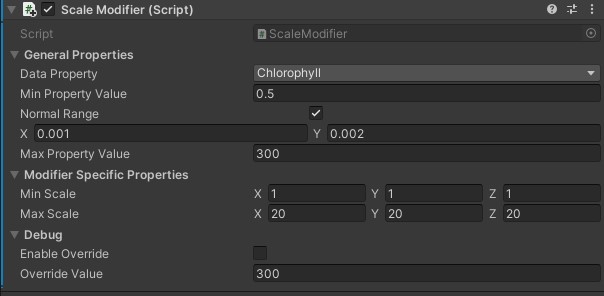
Scale modifier binding chlorophyll to scale.
Debugging and timeline control
During runtime, the application automatically consumes the most recent data to shape the user experience. However, during development it is often necessary to replay data from a specific date or station—for instance, to simulate an algal bloom scenario.
Debug mode: Artists can toggle debug mode on a modifier to override live data with a manually set value. This option is compiled out of release builds to prevent accidental inclusion.
Data stream window: A dedicated editor window allows artists to select a date, station, and sample. Once chosen, all modifiers update to reflect that snapshot, enabling a realistic preview of the scene at that point in time.
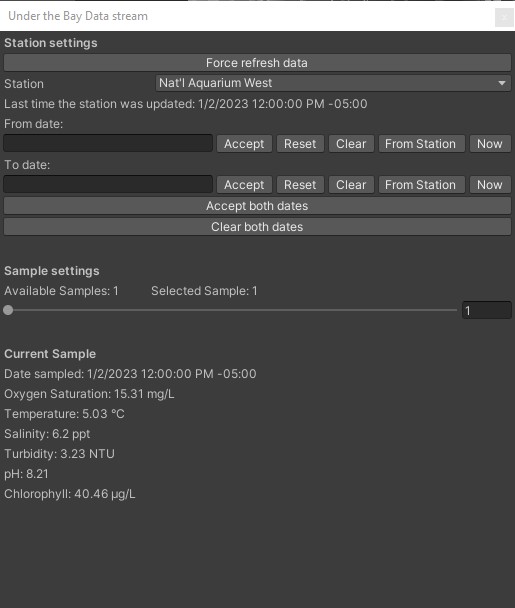
Data stream window