First Contact: Common UI and Enhanced Input
in Unreal Musings on Quickdraw Last modified at: Intro
In this post I will go over some pain points I encountered trying to set up Common UI and the Enhanced Input systems to work together. This post is related to Quickdraw a mini-game I am using as a vehicle to understand more of Unreal Engine’s functionality.
While the purpose of this post is not to teach everything about the two systems –we’d need a lot more than a post for that– you can find some resources to get you started below.
One of the first things the various resources online will have you do is create a CommonUIInputData blueprint and set up the default Click and Back actions. I have found out that doing that can be problematic when Enhanced Input support is enabled. So instead I opted to leave those empty and setup only the EI ones. You can see that in the image bellow:
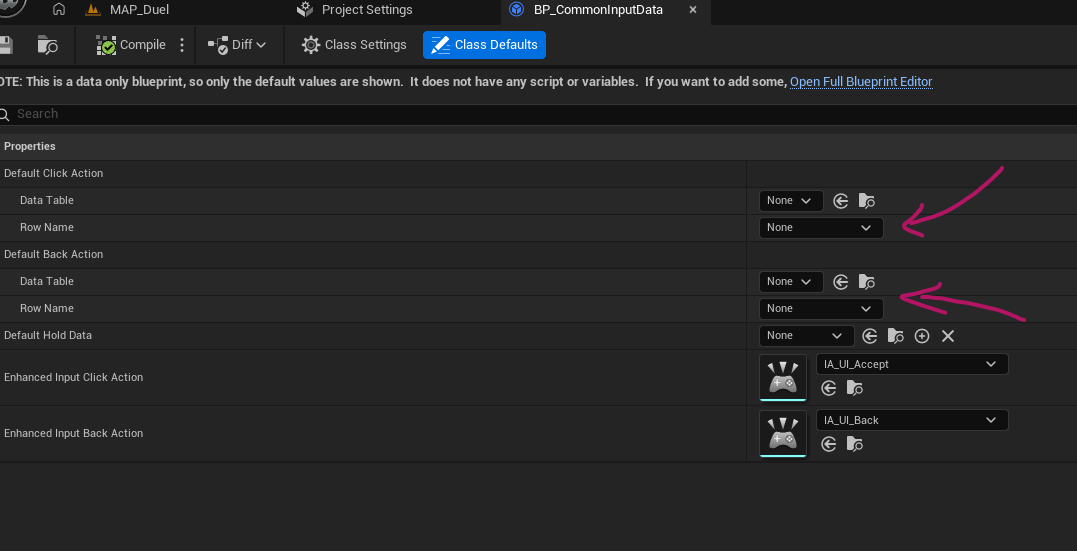
If you do not have the Enhanced Input options, then you need to enable the support from Project Settings > Game > Common Input Settings then check Enable Enhanced Input Support.
The next thing needed is a Common Mapping Context Metadata. You can create one by creating a Data Asset then selecting Common Mapping Context Metadata as the type. These assets allow you to define which of the EI actions are generic and then CommonUI can work with them. Honestly, I was extremely confused with this setup but as far as I can tell, CommonUI needs these metadata to figure out which buttons to show on the various action widgets for instance.
For example, it will be used to do the bellow mapping between your Input Context Mapping (left) and your CommonInputBaseControllerData. That way it can display the icon(s) you have setup in your Controller Data for the Action defined in your Context.
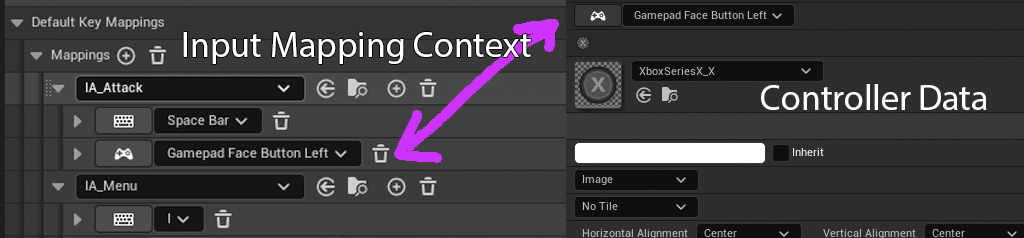 Example of what Common Mapping Context Metadata is used for
Another issue that I ran into was outdated information, tutorials, etc. For example, using SetInput nodes in your blueprints is a recipe for pain with CommonUI. Similarly adding Mapping Contexts to your player through blueprints (gameplay only contexts might still be ok, but I do not know enough to say for sure). Looking at Lyra, here is how it looks like this whole system is supposed to be used:
The game has different layer stacks. In quickdraw I had one for in-game, one for menus and one for popups.
Have your “big UI pieces” define their own input contexts which is applied when the UI gets activated and removed when the UI gets activated.
- An example of this from Quickdraw is that the Main Menu applies a “Generic UI Mapping Context” which has Forward and Back actions, a menu Action (which closes all menus), etc.
Have some “big UI piece” in the in-game layer (most likely your hud) apply the Context Mapping for your in-game actions. A big piece could be a menu, a screen or an entire HUD.
- As an example, my in-game actions are “Attack” and “Menu”. Menu is bound to the same key as in the Generic UI Mapping, but has different functionality. The in-game HUD applies this mapping context once it becomes active.
Input modes should be handled in a similar manner, where specific UI pieces define their desired input when they get activated.
- Lyra has a base component that the menus inherit from with functionality to set the desired input mode. What I ended up doing is override GetDesiredInputConfig in my main UI pieces and provided what I needed through that.
The potential issues I have found with this is that UIs that will be placed in the same stack replace each other’s contexts, but UIs that are in different stacks do not.
For example, from my Main Menu I can open an Instructions UI that explains how to play the game. If I push that widget into the Menu stack, it will replace Main Menu. If both of those Menus need the same Mapping Context, I will end up with no mapping context since activating Instructions adds the context and Main Menu removes it. Setting the mapping context to Tracking can solve this issue, but it still seems like a proverbial foot gun. If however I push Instructions into the Popups stack, Main Menu and therefore its context, remains active and the two UIs can share input actions. Pushing to two different stacks also provides the benefit of Instructions introducing even more controls to the current mapping scheme, though that might be ill-advised in general from a user experience point-of-view.
I am still experimenting and learning about input routing in Common UI, but it seems that game scope has a big effect on how to structure your UI (who would have thunk?). Lyra for instance has an expanded system of UI policies, base classes, etc to address the complexity of a cross platform, enormous scope game like Fortnite. Such a setup will be complete overkill for my tiny, experimental mini-game.